
To say that there is extensive documentation on Apache and its various plugins, including mod_rewrite, is to grossly understate the term. Documentation is voluminous to the point of beginning to wonder if the various authors had a combined total of more than five dates with actual girls in the history of their lives.
Disgruntled, then, was I to discover that on the entirety of the Internet, there was no documentation surrounding what I needed to accomplish. I've since come to realize that this is likely due to the obscurity of the issue or the availability of other commonly known tools to accomplish the task I had before me.
That task: Rewriting and redirecting a URL from my local environment using Apache and mod_rewrite.
Without delving into specifics, I needed to take an HTTP request generated by a page viewed in my browser and direct that request to another location, including a change of domain.
Now, the more seasoned among you may resolve that the very purpose of mod_alias is to perform this task. However, just because I'm a glutton for punishment, in this particular case, I also need to change the value of a query string parameter in the URL having its domain changed. Gaze upon the domain of mod_rewrite, ye mighty, and despair.
While mod_alias is designed to handle the translation of domains, mod_rewrite is designed to handle that
and query string parameters (as well as a bunch of other stuff that I have no idea about). Before we can start directing URLs to and fro, we must first setup Apache.
I'll not regale the reader with the riveting tale of that process as it is rather well (and usefully) documented. The mod_rewrite module must be included in httpd.conf and the Apache instance must be configured to run as 127.0.0.1 on port 80. Do be wary of configuring the server value as localhost because sometimes the value does not translate, especially in Windows. My Apache setup is in Windows 7 x64 with OpenSSL.
The next thing to do is to direct all HTTP requests from the domain that needs to be changed to the local instance of Apache. In Windows, this is easily accomplished via the Windows HOSTS file. An example entry would look like this:
127.0.0.1 ihatecake.neodux.com
This entry will override DNS requests for ihatecake.neodux.com and point it instead to localhost. Apache takes over from there.
With that in mind, let us consider an example URL value:
http://ihatecake.neodux.com/serve?feedme=pie
Clearly, no one hates cake and that pesky query string is returning pie instead of cake, which simply isn't fair. This injustice will not stand; we must modify and redirect this request to attain cake righteousness.
In order to engage mod_rewrite, the traditional method is to add rules to Apache's docroot in the .htaccess file. Because we're not actually dealing with anything in Apache's docroot (despite all the documentation examples using only this scenario), these rules need to go inside httpd.conf. Assuming you've got Apache configured and running, this is quite simple. At the bottom of your configuration file, add a virtual host for your localhost instance of Apache and include the rules to enable mod_rewrite's magic. The first step is to turn the mod_rewrite engine on. It looks like this:
NameVirtualHost 127.0.0.1:80
RewriteEngine on
The next step is to write a conditional statement inside the virtual host instruction set looking for the feedme query string parameter. In Apache, mod_rewrite accomplishes this via regular expression. Now before your panties fully bunch, allow me to assure you that this implementation of regular expressions is very simple once you break it down, so don't let the syntax scare you. The conventions are largely the same as those used in perl, so if you're a perl nerd this will not seem out of place. These condition and rule execution statements accomplish our goal of translating ihatecake to ilikecake and the feedme query string from pie to cake:
NameVirtualHost 127.0.0.1:80
RewriteEngine on
RewriteCond %{QUERY_STRING} ^(.*)feedme=pie(.*)$
RewriteRule ^/.*serve.*$ http://ilikepie.neodux.com/server?%1feedme=cake%2 [R,L]
Let's break it down: The first thing I did is to write a RewriteCond statement that evaluates the query string of the URI for feedme=pie. Most mod_rewrite rules follow the basic convention of RuleName Pattern Pattern, so the RewriteCond rule matches the %{QUERY_STRING} Apache variable against the second pattern. The carat tells mod_rewrite that this is the beginning of a string. The (.*) essentially says, "This means everything before feedme, and since I'm wrapped in parentheses, remember my crap for later." You'll see another usage of that after feedme=pie, so that the entire statement reads [everything before feedme=pie]feedme=pie[everything after feedme=pie]. The dollar sign then signifies the end of the string. In this way, mod_rewrite is able to localize on what you actually want to modify. The purpose, and dare I say the beauty, of the RewriteCond statement is that the RewriteRule statement will not execute unless RewriteCond finds what it is looking for.
The second statement is the RewriteRule. where the URL is modified. Based on what we found (and stored) in RewriteCond, RewriteRule starts its search for the end of the URL, /serve. Again, we see the use of the carat to signify the beginning of a matching string, and the use of .* to mean, "Everything before serve." The dollar sign marks the end of the first pattern string. The second pattern string contains the values we want to change the incoming request to. Since I want to go to ilikepie instead of ihatepie, I can substitute the literal translation here, which I find to be incredibly helpful. After server, where the question mark begins the query string, the usage of the %1 variable says, "Put anything that existed before feedme here." Remember, the condition statement only matches against values found in the query string, so this allows you to rewrite requests that have multiple query strings and/or where feedme is not necessarily the first query string in line. We then substitute the feedme parameter value of pie for cake, and use the %2 variable to include anything that came after feedme.
That's it, right? Close, but there is the matter of the bracketed values out to the right, [R,L]. These are mod_rewrite flags that tell Apache to do certain things. All the flags are covered in the regular mod_rewrite documentation, but R and L are fairly common in their usage. R tells Apache that this should be a redirect, not referencing something in Apache's docroot. If you have a specific need to have the redirect be 301 instead of 302, you can specify that as R 301 or R 302, but it defaults to 302.
The L flag, literally translated, means last rule. It is designed to make mod_rewrite stop looking for additional rules if this rule is successful. This is helpful if you have several RewriteRule statements and don't want to risk having a modified request modified again incorrectly. Also remember that mod_rewrite rules are processed before mod_alias rules and other modules, no matter where they are in relation to each other inside httpd.conf. In essence, the rules are not processed serially.
To test this setup, you can write a local page and view it in your browser. Ensure that you view it via Apache and not from the file via the OS. Using an HTTP request logger like HttpFox for Firefox, you can see the redirect and translation occur in real time.
HTTP request rewriting and redirecting is usually something found in the realm of Squid or other proxy servers. While those tools do work well, novice users (like me) tend to have profound difficulty in getting through the initial setup because those tools are so powerful and have so many options. The setup and operation of Apache, especially as a local web server, is far easier and there are a lot of easy to understand tutorials and other documentation available for it. It's also easier in Apache to lock down access to your instance to only localhost or only your LAN subnet that it is in some other tools.
While this may be elementary to a seasoned Apache guru, I am, by far, not a seasoned Apache guru and it took a great deal of time (and some help from an Apache guru) to make this work for me and to build my understanding of it. Because this specific application of Apache and mod_rewrite was not documented anywhere I could find on the Internet, I though it should be included in the annals of Neodux. Hopefully the next poor fool who needs to do something like this can find it via Google search instead of banging his head against the wall for a week like I did.

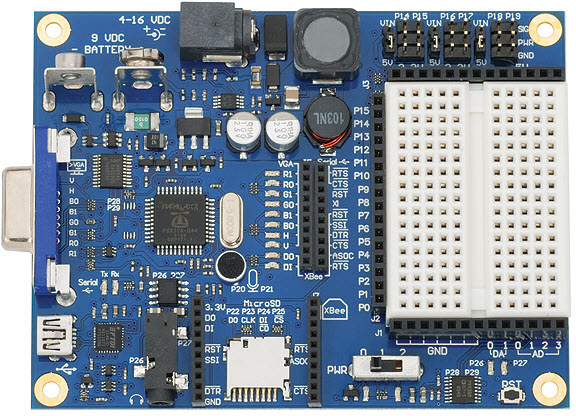 I recently picked up a Propeller Board of Education from my recent trip to Parallax, Inc to teach the Teachers' Institute for the ARRL. The Propeller is Parallax's latest microcontroller platform that offers far more than the old beloved BASIC Stamp could. Digging back through my old posts, I found my initial review of the Parllax BASIC Stamp from 2006. (Little did I know that about 5 years later I'd begin teaching classes on the Stamp, visit Parallax HQ, and befriend the author of the "What's a Microcontroller" book (among other titles).)